
Download Enterpix – Free AI Art Generator, Prompt Enhancer & Creative Search Engine
Overview & Core Features
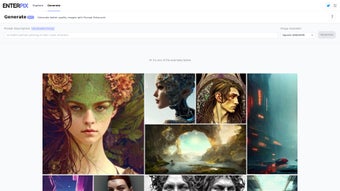
Enterpix is a cloud‑based AI art platform that doubles as a searchable gallery and a real‑time generation studio. Built for visual creators ranging from concept artists to hobbyist designers, the service aggregates millions of images produced by leading models such as Midjourney, DALL·E, Stable‑Diffusion, and newer open‑source engines. The result is a constantly refreshed repository of fantasy realms, sci‑fi cityscapes, classic portraiture, and abstract experiments that can be browsed, filtered, and saved directly from any modern web browser.
What truly distinguishes Enterpix is its integrated Prompt Enhancer—a smart assistant that takes a simple description, enriches it with style tags, adjusts resolution‑specific parameters, and suggests refined wording to maximize image quality. Users can instantly generate variations, compare outputs, and store favorite results in personal collections that sync securely to the cloud. The platform also offers seamless one‑click linking to ArtStation, DeviantArt, Behance, and other creative hubs, enabling both import of external mood boards and export of AI‑crafted assets.
Whether you’re brainstorming a client pitch, sketching a game environment, or simply exploring the limits of generative art, Enterpix provides a secure, free‑to‑start environment that balances discovery with production.
- Multi‑Model Gallery: Live feed of artwork generated by Midjourney, DALL·E, Stable‑Diffusion, and emerging models.
- Prompt Enhancer: Automatic suggestion of adjectives, style tags, and resolution‑aware tweaks for clearer, more detailed images.
- Personal Collections: Tag, organize, and share saved images in encrypted cloud storage.
- Theme & Artist Filters: Browse by genre (fantasy, sci‑fi, portrait) or by influencer (e.g., Ruan Jia, Alphonse Mucha).
- Cross‑Platform Integration: Direct publishing to ArtStation, DeviantArt, Behance, and other portfolios.
- Responsive UI & PWA: Works on desktop browsers and mobile devices; optional progressive web app for a desktop‑like window.
- Secure Cloud Sync: HTTPS encryption, two‑factor authentication, GDPR compliance.
- Regular Model Updates: Quarterly additions of new AI engines and style packs.
By merging a searchable AI‑art archive with a generation engine, Enterpix eliminates the need to toggle between separate tools. The Prompt Enhancer’s ability to auto‑balance lighting, color palette, and composition based on the chosen resolution dramatically reduces the trial‑and‑error loop that typically plagues AI art creation. In addition, the platform’s emphasis on privacy—encrypted collections, optional 2FA, and strict data‑handling policies—makes it suitable for professional environments where client confidentiality is paramount. Overall, Enterpix offers a compelling mix of inspiration, creation, and secure asset management, all without requiring a heavyweight software download.
Installation, Workflow & Compatibility
Zero‑Download Onboarding
Because Enterpix is entirely web‑based, there is no traditional installer. To begin, visit enterpix.com, click “Sign Up,” and create a free account using an email address or a supported social login (Google, GitHub, Apple). After confirming the verification email, you can optionally enable two‑factor authentication for added security. The platform’s onboarding wizard walks you through the creation of your first collection, a quick test of the Prompt Enhancer, and the basics of bookmarking images.
Step‑by‑Step Workflow
- Sign Up & Verify: Complete the email verification and set up 2FA if desired.
- Explore the Gallery: Use the top navigation bar to filter by AI model, style, or theme. Click any thumbnail to view full‑size metadata (model version, original prompt, resolution).
- Generate with Prompt Enhancer: Press “Create New,” type a brief idea (e.g., “misty cyberpunk alley at sunrise”), choose a target resolution (e.g., 1920 × 1080), and let the enhancer suggest refined wording and style tags.
- Review & Save: After the AI returns an image, you can like, comment, or add it to a personal collection. Collections are searchable and can be shared via a private link.
- Export or Publish: Download the final artwork in PNG or JPG format, or push it directly to ArtStation, DeviantArt, or Behance using the integrated “Publish” button.
Operating System Support
Enterpix runs on any modern browser, making it compatible with Windows 10/11, macOS 12+, Linux distributions, Android 8+, and iOS 13+. The responsive layout adapts to laptops, desktops, tablets, and smartphones. For power users, a progressive web app (PWA) can be installed on desktop or mobile, providing an app‑like window with offline caching of saved collections.
Performance is primarily dictated by your internet connection. Enterpix leverages CDN edge servers for rapid image delivery, and the backend AI generation scales automatically, typically returning results within 10‑30 seconds for standard resolutions. Users on slower networks can opt for low‑resolution previews to speed up iteration, then upscale the final image once satisfied with the composition.
Pros, Cons & Frequently Asked Questions
Pros
- Vast, constantly updated library from multiple top‑tier AI models.
- Prompt Enhancer dramatically cuts down on trial‑and‑error for beginners and pros alike.
- No software download; fully functional in any modern web browser.
- Encrypted cloud storage protects personal collections and supports seamless cross‑device sync.
- One‑click integration with ArtStation, DeviantArt, Behance, and other creative platforms.
- Responsive design with optional PWA for a native‑app feel.
Cons
- Free tier limits the number of high‑resolution exports per month.
- Advanced model controls (custom seeds, fine‑tuned parameters) are reserved for paid subscriptions.
- Full functionality depends on a stable internet connection; offline mode is limited to cached collections.
FAQ
Is Enterpix really free to use?
Enterpix offers a free tier that includes unlimited browsing, prompt enhancement, and a limited number of high‑resolution downloads each month. Paid plans unlock additional exports and advanced model settings.
Can I use the images for commercial projects?
Yes. All images generated under the standard license are royalty‑free for commercial use, provided you follow the platform’s terms of service. Certain premium models may have extra restrictions, which are clearly indicated during generation.
How does the Prompt Enhancer improve my results?
The enhancer analyses your initial phrase, injects stronger adjectives, adds relevant style tags (e.g., “cinematic lighting,” “vibrant palette”), and aligns the prompt with the chosen resolution. This leads to clearer, more detailed images with fewer iterations.
Do I need a powerful computer to run Enterpix?
No. All AI processing occurs on Enterpix’s servers. Your device only needs to handle standard web browsing, making the platform accessible on older laptops, tablets, and smartphones.
Is my data safe on Enterpix?
Enterpix employs HTTPS encryption for all data transfers, stores collections in an encrypted cloud database, and offers optional two‑factor authentication. The service complies with GDPR and major privacy regulations.
Review Summary
Overall Rating: ★★★★☆ (4.2/5)
Pros: Extensive AI model library, intuitive Prompt Enhancer, cross‑platform access, secure cloud storage.
Cons: Export caps on the free plan, occasional latency during peak usage.
Conclusion & Call to Action
Enterpix positions itself as a bridge between artistic imagination and cutting‑edge AI generation. By unifying a searchable AI‑art gallery with a smart Prompt Enhancer, the platform empowers creators of all skill levels to discover fresh visual directions without installing heavyweight software. Its browser‑first design, encrypted cloud storage, and seamless integration with major art communities make it a practical choice for freelancers, small studios, and hobbyists alike. While the free tier imposes modest export limits, the value delivered—especially for rapid prototyping, mood‑boarding, and inspiration‑driven brainstorming—far outweighs the constraints for most users. Professionals seeking higher‑resolution assets and deeper model controls can upgrade to a paid plan for a cost‑effective expansion of capabilities.
Ready to boost your creative workflow with AI‑driven inspiration? Download Enterpix now (simply sign up and start creating) and explore a world where a single prompt can unlock limitless visual possibilities. Join the growing community of artists reshaping their process with AI—your next masterpiece could be just a click away.



.png)



